
- What is Making Tax Digital for Landlords?
- When Does Making Tax Digital Start for Landlords?
- Who Needs to Comply with Making Tax Digital?
- Making Tax Digital for Landlords: Compliance Checklist
- What Records Landlords Must Keep Digitally?
- How to Register for Making Tax Digital?
- Common Challenges Landlords May Face
- FAQs: Frequently Asked Questions
- Conclusion
If you are a landlord in the UK, you must have experienced the annual January rush. The once a year hustle to gather receipts, calculate rent and file a self assessment tax return.
However, now with changing times the UK government is currently implementing the most significant change in the history of tax filing. That is Making Tax Digital for landlords.
MTD for ITSA is now live for landlords earning above £50,000. The yearly self-assessment tax return has been replaced with quarterly digital updates to HMRC. The 6 April 2026 deadline has now passed for landlords earning above £50,000. If you haven’t yet enrolled or started keeping digital records, you need to act immediately to avoid HMRC penalties.
In this blog, we will be understanding how landlords can keep themselves prepared and ready for MTD. You will be learning some crucial information about MTD. So make sure to read till the end.
What is Making Tax Digital for Landlords?
The UK government has come up with a new initiative of Making Tax Digital. Under this program, HMRC aims to transform the UK tax system from “offline to digital”. As per this new change, landlords who fall under Making Tax Digital for revenue tax self assessment (MTD for ITSA) represent a significant change in how rental revenue and expenses will be reported.
This change will be introduced in phases, beginning with higher income landlords and eventually extending to smaller landlords. Giving everyone time to adapt to the new change. HMRC’s main aim of MTD is to make the tax filing process error free.
When Does Making Tax Digital Start for Landlords?
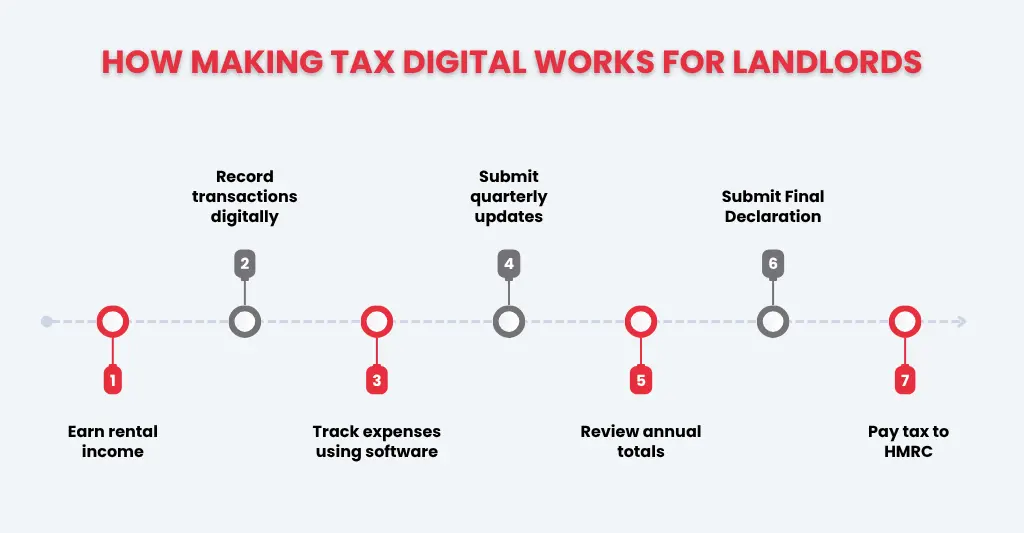
MTD for ITSA was officially implemented on 6 April 2026. Landlords earning more than £50,000 per year in gross rental revenue (including self-employed income, if applicable) must comply with MTD after this date. A second wave of compliance will apply to persons earning between £30,000 and £50,000 beginning in April 2027.
Even if you are not yet compelled to implement MTD, it is necessary to start planning early. Understanding the rules today, and migrating gradually, will make future compliance much easier.
Who Needs to Comply with Making Tax Digital?
Making Tax Digital is a key part of the UK government’s initiative to modernise the tax system. It requires businesses and individuals to keep digital records and use MTD-compatible software when submitting tax returns to HMRC.
The deployment of MTD for Income Tax Self Assessment (ITSA) is limited to those who earn more than a specified amount from self-employment or property.
Landlords who must follow MTD
If you are a landlord, your requirement to join MTD for ITSA landlords depends on your gross rental income. The mandate will be implemented in phases:
- From April 2026: Landlords and self-employed individuals with an annual combined income of more than £50,000 must comply.
- From April 2027: Landlords and self-employed individuals with an annual combined income of more than £30,000 must comply.
Key Requirements for Compliance:
- Digital Records: As per HMRC law maintaining landlord tax digital records, your rental income and expenses is mandatory.
- Quarterly Updates: You need to send a summary of your business income and expenses to HMRC every three months via a compatible software.
- Final Declaration: At the end of the tax year, you should finalise your business income and submit a final declaration to HMRC.
Landlords who may be exempt
While the government intends for comprehensive digital adoption, some landlords are now excluded from MTD for ITSA.
- Income Below the Threshold: If your total qualifying income from property and self-employment is less than £30,000, you aren’t obligated to join MTD.
- Digitally Excluded: You may be eligible for an exemption if you can justify that using digital tools is not practical for you. This generally applies because:
- Age, disability, or location (e.g., lack of internet access).
- Religious beliefs that are incompatible with using computers.
- Foreign Property Landlords: If your only source of income is a foreign property business and your income is below the threshold, you will continue to use the standard Self Assessment system for the time being.
Making Tax Digital for Landlords: Compliance Checklist
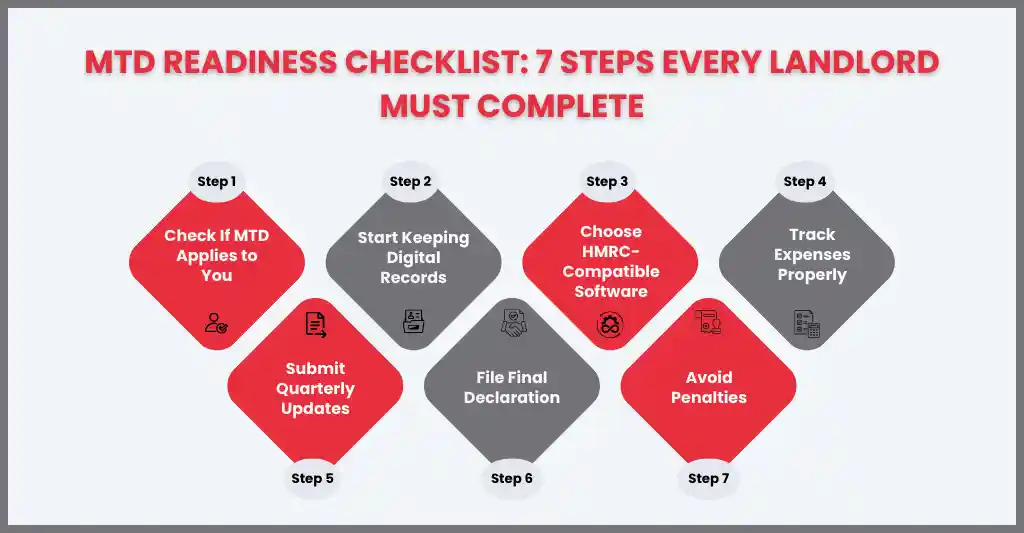
This checklist completes the transition from setup to the continuing reporting cycle mandated by HMRC. Once you have your software and digital records in place, the processes below will establish your annual relationship with the tax office.
Confirm if MTD Applies to You:
Initially, only landlords with an annual income of £50,000 from property or self-employment are affected, but this will gradually extend to all landlords. The government has indicated that the threshold may extend to £20,000 by 2028/29, but this has not yet been confirmed in legislation. Check HMRC’s latest guidance for updates.
Start Keeping Digital Records
Landlord tax digital records should include all income and acceptable expense.This includes rental income, maintenance costs, mortgage interest (if applicable), and other property-related expenses. Proper record-keeping will make quarterly submissions easy and reduce errors.
Choose HMRC-Compatible Software
Choose accounting software that is MTD-compatible and approved by HMRC. This software allows you to send quarterly updates immediately, automate computations, and assure compliance with the Making Tax Digital standards.
Prepare for Quarterly Updates
Quarterly updates must be submitted by the 7th of the month following the end of each tax quarter:
- Quarter 1 (6 April – 5 July): Due by 7 August.
- Quarter 2 (6 July – 5 October): Due by 7 November.
- Quarter 3 (6 October – 5 January): Due by 7 February.
- Quarter 4 (6 January – 5 April): Due by 7 May
Submit the Final End of Period Statement(EOPS)
After four HMRC quarterly updates for landlords, you need to submit a final end of period statement through MTD compatible software. This statement reconciles all quarterly updates, reports the year’s total income and costs, and guarantees that any tax owed is calculated appropriately and filed to HM Revenue & Customs. It serves as a digital version of the annual Self Assessment return for rental revenue.
What Records Landlords Must Keep Digitally?
As per HMRC rules, landlords should maintain all income and expenses records related to rental property in the digital format. Key records include:
- Rental income: Every rental payment received from tenants should be recorded accurately.
- Property expenses: Costs for maintenance, repairs, utilities, insurance, and management fees.
- Receipts and invoices: Don’t forget to maintain digital copies of all supporting documents that show income and expenses records.
How to Register for Making Tax Digital?
To comply with Making Tax Digital, landlords need to register for MTD with HMRC. Following steps should listed below
- Check Eligibility: Make sure to check the eligibility criteria whether you fit under the threshold limit mentioned above.
- Create a Government Gateway Account: If you don’t have an account, open the account on the HMRC official website.
- Enroll for MTD for Income Tax: Log in to your Government Gateway account and enroll specifically for MTD for ITSA (Income Tax Self Assessment).
- Choose Compatible Software: Make sure to use MTD compatible software, so your tax filing and maintaining record can be done seamlessly.
- Confirm Registration: HMRC will notify you once your MTD enrollment is active, allowing you to begin submitting changes digitally.
Common Challenges Landlords May Face
Starting with Making Tax Digital might be a simple procedure for some landlords, but many face common challenges while beginning with MTD. Being aware of the challenges will help you be prepared to tackle them easily.
- Digital Record keeping: Many landlords have a habit of keeping paper form receipts and spreadsheets. Therefore, suddenly shifting to digital platforms may feel stressful. The key is to begin with small changes, such as scan invoices, maintain rental payments digitally, or try beginner friendly MTD software for property landlords.
- Software Compatibility: Software must comply with HMRC requirements. Landlords often struggle to find suitable solutions that integrate with existing spreadsheets or property management programs.
- Accurate Income and Expenses Tracking: Sometimes, it becomes difficult to record all payments, invoices, and deductions. Especially with multiple properties or when tenants have different payment schedules.
- Understanding Deductible Expenses: Landlords often struggle to distinguish between eligible expenses (such as repairs and insurance) and non-deductible expenses. Errors in this area can affect your tax obligations.
- Keeping Up with Tax Updates: Landlord tax rules, thresholds, and reliefs are subject to change on a yearly basis. Staying current and ensuring that your software reflects these changes is critical to avoiding compliance difficulties.
FAQs: Frequently Asked Questions
Is Making Tax Digital mandatory for landlords in the UK?
Yes, HMRC has made MTD for landlords UK mandatory with rental income above a certain threshold limit. From 6 April 2026, landlords earning income above £50,000 must maintain digital records and submit quarterly updates using MTD compatible software.
Do new landlords need to use Making Tax Digital?
New landlords don’t need to begin Making Tax Digital now. They must comply once their first self-assessment is filed and their rental income meets the MTD thresholds.
What income is included in Making Tax Digital for landlords?
MTD for landlords includes all rental income from UK properties, whether furnished or not. Apart from it following things also count:
Rent from residential properties
Rent from furnished holiday lettings
Any additional property-related income (e.g., service charges, premiums)
Does rental income from multiple properties count toward the MTD threshold?
Yes, MTD thresholds are based on total gross rental income acquired from all properties owned by you.
Does Making Tax Digital apply to jointly owned rental properties?
Yes, each owner must report their share of rental income. MTD compliance depends on each individual share of income, if the share meets the threshold limit they must keep digital records and submit quarterly reports to HMRC.
Do landlords with a limited company need to follow Making Tax Digital?
No. Landlords who operate through a limited business pay Corporation Tax rather than Income Tax, so MTD does not apply to them. However, they must still keep correct records and submit annual Corporation Tax filings to HMRC.
What happens if landlords miss an MTD quarterly submission?
If a landlord fails to submit a quarterly MTD return, HMRC may levy penalties such as late filing fees and interest on unpaid tax. Repeated or extended delays might result in greater fines, so submit on time or call HMRC if you have any concerns.
What penalties apply for not complying with Making Tax Digital?
Landlords who fail to comply with MTD may face:
Late submission penalties for missing quarterly updates
Interest on unpaid tax
Fines for repeated non-compliance
Potential HMRC enforcement actions if issues persist
Staying on top of digital record-keeping and deadlines helps avoid these penalties.
Can landlords manage Making Tax Digital without an accountant?
Landlords can manage MTD using HMRC-compatible software, particularly if they have a limited number of properties and straightforward rental revenue. If you have to manage large numbers of tenants and properties then you should hire an accountant to take care of every accounting record.
What is the best software for Making Tax Digital for landlords?
HMRC maintains a list of compatible software at gov.uk, choose one that suits your needs. It allows you to record your rental income and permissible costs quarterly and send updates directly to HMRC. The product supports digital submissions and Excel bridging if necessary.
Will Self Assessment be replaced by Making Tax Digital for landlords?
Yes. For landlords who meet the MTD standards, the yearly Self Assessment return will be replaced by quarterly digital submissions and a year-end declaration using HMRC-compatible software.
Does selling a rental property affect Making Tax Digital reporting?
Yes. If you sell a rental property, you must declare the sale and any capital gains in your MTD reports. Maintain digital records of the sale price, permitted costs, and related expenses so that HMRC may accurately compute any taxes owed in your quarterly updates or final declaration.
Conclusion
MTD is a new big change for UK landlords, it just requires proper planning and understanding to adapt to the change. Without taking stress of tax filing landlords can avoid penalties by maintaining proper digital records, using HMRC compatible software, and adhering to deadlines. Planning early will give time to resolve the issues early and provide more confidence and control over property finances.
Landlords that adopt digital record-keeping not only remain compliant, but also have superior visibility into cash flow, expenses, and profitability. Adopting the appropriate tools and technologies can surely ease the process, decrease errors, and free up time that could be better spent managing properties or focusing on expansion. Whether you manage a single property or a portfolio, beginning small, remaining organised, and seeking professional help as needed can ensure a smooth transition to MTD. Finally, being proactive and prepared enables landlords to operate their rental business efficiently, stay ahead of HMRC obligations, and make sound financial decisions with confidence.
Disclaimer: Kindly note this blog provides general information and should not be considered financial advice. We recommend consulting a qualified financial advisor for personalised guidance. We are not responsible for any actions taken based on this content.